Astra limits third-party tracking and keeps your browsing data on your device — not on our servers.
01
Trackers blocked by default
Astra's tracking protection helps stop third-party trackers from following you across websites. Many sites load invisible scripts that collect browsing habits — Astra works to block those requests before they leave your browser.
02
Part of a privacy-first design
Tracking protection is not an afterthought. It sits alongside Astra's built-in ad blocker, local-only backups, and no-telemetry policy. The goal is simple: your browsing should not become someone else's data product.
03
Local data stays local
Bookmarks, history, and settings are stored on your device — not uploaded to Astra's servers. Local Auto-Backup keeps a copy on your machine without involving any cloud service. You control when and how your browsing data is cleared.
04
No telemetry from Astra
Astra does not collect usage analytics, browsing history, or personal data. The browser does not phone home with what you read, search for, or click. What you do online stays between you and the sites you visit.
Read the full Privacy Policy for details on data
collection, local storage, and your rights.
Installation guide
Windows may ask before installing
Astra is built on the same secure Firefox and Zen foundations you trust. Because we are
still growing as a student-led project, we have not yet purchased the expensive Windows
code-signing certificate. Windows SmartScreen may show a one-time notice — this is normal
and does not mean Astra is unsafe.
01
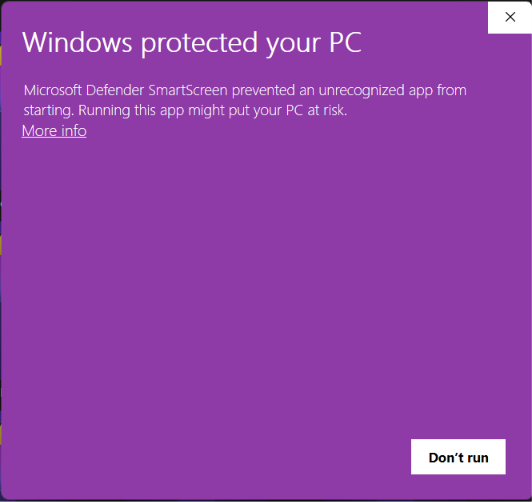
Click “More info”
When the purple Windows screen appears, select the underlined
More info link.
Step 1 · SmartScreen first screen
02
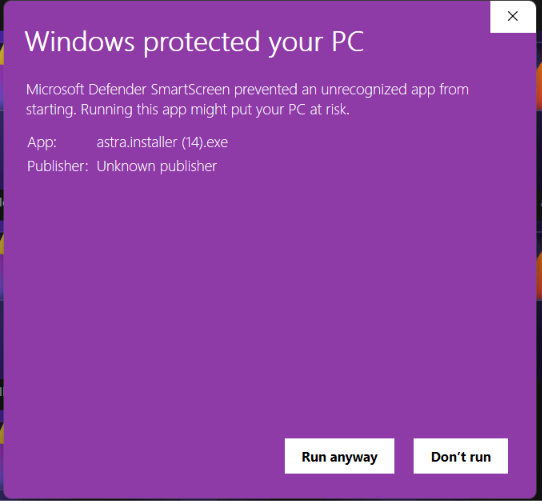
Click “Run anyway”
On the next screen, choose Run anyway to start the Astra installer.
Step 2 · Run anyway to install
03
Your installer is installing
After you click Run anyway, the Astra installer opens and setup begins automatically.
Your download has started. Follow the two steps above when Windows asks.
Your installer is installing
Follow the steps when Windows SmartScreen appears.