01
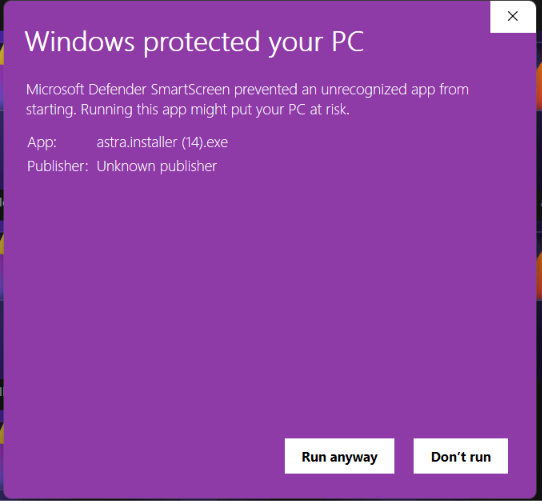
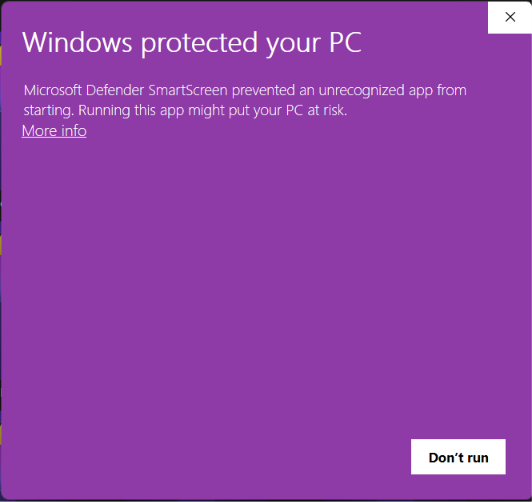
Click “More info”
When the purple Windows screen appears, select the underlined More info link.
Astra Browser is built around privacy and local control. This Privacy Policy explains what data stays on your device, what optional services you may choose to use, and what the Astra project does not collect.
The Astra project does not operate a telemetry pipeline, analytics service, or cloud sync backend. We do not receive your browsing history, search queries, bookmarks, passwords, or other personal data from your use of Astra Browser.
Astra removes Mozilla Firefox telemetry and crash reporting that would send data to Mozilla by default. The Astra team does not collect usage statistics, crash dumps, or diagnostic reports from your browser.
If you choose to send feedback through GitHub, email, or Discord, you control what you share in those messages.
Astra does not collect personal information such as your IP address, browsing history, search queries, or form data. Anything you browse or type stays on your device unless you explicitly use a third-party feature described below.
Astra does not embed third-party analytics or advertising trackers. Tracking protection features help limit cross-site tracking by websites you visit, but individual sites may still set cookies or request data according to their own policies.
Like other browsers, Astra may connect to the internet to check for updates, verify add-on updates, load web pages you request, and support standard web features (for example, push notifications or geolocation when a site asks and you allow it). These connections serve the page or feature you requested — they are not an Astra telemetry pipeline. Advanced users can review and adjust many network-related settings in about:config.
Astra stores certain data locally on your device to enhance your browsing experience. This includes:
Any customizations, settings, and preferences you make within Astra are stored locally on your device. We do not have access to or control over this data.
Astra does not provide its own cloud sync service. If you choose to enable Mozilla Firefox Sync, your encrypted data is handled by Mozilla’s infrastructure under their privacy policy — not by Astra. Astra cannot read synced data. Local Auto-Backup stores copies on your device only and does not upload them to Astra.
You can install add-ons from addons.mozilla.org; Astra checks for add-on updates through Mozilla’s systems when you use that feature. You can also install Mods from astra-browser.app/mods. Mod files are static content downloaded to your device. This website does not use analytics or tracking scripts when you download mods.
Bookmarks, history, settings, and backups created by Astra are stored locally on your device. We recommend using device encryption, strong passwords, and keeping your software up to date.
You have full control over all data stored locally on your device by Astra. You can clear your browsing data, cookies, and cache at any time using the browser's settings.
The astra-browser.app website is a static site. We do not run third-party analytics, advertising trackers, or Astra-owned telemetry on this site. Basic hosting infrastructure (for example, Cloudflare) may process HTTP requests for security and delivery; that processing is not linked to your Astra Browser usage.
This site and Astra may link to external services such as GitHub or Discord. Those services have their own privacy policies. Review them before sharing personal information there.
We may update this Privacy Policy when practices or legal requirements change. The date at the top of this page shows when it was last revised. Continued use of Astra after updates means you accept the revised policy.
Astra builds on Firefox. We disable telemetry where possible, but upstream code may still contain optional network features. For Mozilla’s own data practices, see:
Questions about this Privacy Policy or Astra Browser? Reach us at:
Your installer is installing